The SEO Slow Burn: How to Measure SEO Results & Performance

The first time I opened Google Search Console on one of my own websites, I was expecting some kind of proof that all my work was adding up. Instead, I got a flat line. No clicks, no impressions — just a graph that looked like it had given up on itself.
Here’s the thing: I had done everything right. Blog posts were live, keyword research was done, and I’d been hitting publish for weeks. But looking at those empty numbers, it felt like the whole strategy had fallen apart before it even started.
What I didn’t understand yet was that I was looking for the wrong signals at the wrong time. Waiting for sales when impressions were the milestone I should have been watching. Expecting traffic when what actually needed to happen first was indexing. SEO isn’t a sprint — and the sooner you make peace with that, the better your relationship with your data will be.
If you’ve ever stared at your analytics thinking is any of this even doing anything? — keep reading. Here’s what actually matters when you’re measuring SEO results, and what it means when the numbers still feel quiet.
Key Takeaways:
- SEO results typically start showing up between 3 and 6 months, with meaningful traction often arriving closer to 9 months for competitive niches
- Not all SEO metrics are equal — impressions, rankings, and click-through rate each tell a different part of the story
- Google Search Console and Google Analytics 4 are the two free tools you actually need
- Consistency in publishing directly impacts how quickly your content compounds
- About one in every 100 website visitors eventually converts to a paying client, which means volume matters and volume takes time
Why SEO Results Take Time (and Why That’s Not A Bad Thing)
The short version: Google needs to trust you before it sends anyone your way.
Every piece of content you publish has to be crawled, indexed, evaluated against competing pages, and placed somewhere in the rankings. That entire process takes time, and in most niches, “time” means somewhere between 3 and 9 months before a new post starts ranking in any meaningful way. In health and wellness — a competitive space with a lot of existing content — it often takes longer.
I went through this with my own pages. Some of them sat in “indexed but not ranking” territory for weeks before they budged. My first instinct was to assume something was technically broken, so I paid for a proper audit of my Google Search Console backend.
The verdict? Nothing was wrong.
Google was just taking its time. That experience is actually what cemented my belief in original, experience-based content — because what the audit also confirmed is that a unique perspective is what eventually moves the needle. Google doesn’t just reward volume. It rewards expertise it can trust.
This is also the core difference between SEO and paid ads, and it’s worth saying plainly. Paid traffic starts the moment you fund a campaign and stops the moment you turn it off. SEO takes longer to build, but a blog post you publish today can still be driving traffic two years from now. That’s the difference between renting your visibility and actually owning it. For a deeper look at how the long game works, the complete SEO guide for service providers breaks it all down.
The Metrics That Actually Tell Your SEO Is Working
Most people open their analytics, check their traffic numbers, and close the tab. Traffic matters, but it’s only one piece of a much larger picture. Here’s what to actually look at — and what each number is telling you.
Impressions: This is the number of times your page showed up in Google search results, regardless of whether anyone clicked. Rising impressions in the early months are your first green flag — they confirm that Google has indexed your content and is actively surfacing it for searchers.
Average Position: Your average position indicates where your page typically ranks for the keywords it’s shown for. Position 40 means you’re buried on page four. Position 8 means you’re one good optimization away from the first page. This number should trend downward over time, and watching that slow descent is genuinely satisfying once you know what you’re looking at.
Click-Through Rate (CTR): CTR is the percentage of people who saw your listing in search results and actually clicked through to your site. When a page has solid impressions but a low CTR, the content may be ranking fine — the problem is usually that the headline or meta description isn’t compelling enough to earn the click.

Organic Traffic: This is the one everyone watches, and for good reason. It’s the count of visitors arriving specifically from search engines, not from social or email. The catch is that organic traffic almost always lags behind impressions and rankings by weeks to months, which is why watching only traffic in the first few months tends to feel demoralizing.
Conversions and Contact Form Completions: Traffic that doesn’t convert to action isn’t doing much for your business. For service providers, conversion activity usually means contact form submissions, lead magnet downloads, or clicks on a booking link. Getting this event tracking set up in GA4 early is important because it’s the only way to know whether your SEO efforts are producing real business results.
A useful benchmark to keep in mind: statistically, roughly one out of every 100 website visitors to your sales/service page becomes a paying client. The goal of your SEO strategy isn’t just to rank — it’s to create enough consistent volume that a one-in-a-hundred conversion rate produces real, steady inquiry flow.
GOOGLE SEARCH CONSOLE: Your First Stop for Measuring SEO
Google Search Console is a free tool that shows you exactly how your site is performing in organic search — clicks, impressions, average position, and click-through rate, all broken down by query, page, country, and device. For anyone serious about measuring SEO results, it’s non-negotiable. It’s the only tool that shows you the actual keywords people are using to find your site.
How to get started:
- Go to search.google.com/search-console and sign in with your Google account
- Add your website as a property (use the domain verification option when possible)
- Add the provided TXT record to your domain registrar to verify ownership
- Submit your sitemap (usually yoursite.com/sitemap.xml) so Google knows which pages to crawl
- Give it 48 to 72 hours for data to start populating
One thing worth knowing: Search Console only shows data starting from the day you verify your site.
There’s no way to retrieve historical data before that date. Set it up as early as you can — even if you’re not ready to analyze anything yet.
Once data starts flowing, the Performance report is where you’ll spend most of your time. Filter by page to see which posts are getting impressions, filter by query to see what keywords are actually driving clicks, and pay attention when a page has high impressions but low clicks — that usually points to a title tag or meta description that needs work, not an SEO problem.
For a full walkthrough of how to use this tool in practice, this post on tracking SEO performance in Search Console covers everything step by step.
GOOGLE ANALYTICS 4: What Happens After The Click
Search Console tells you how people find your site. Google Analytics 4 tells you what they actually do once they arrive — and the two together give you a genuinely complete picture.
GA4 is free, and it answers questions like:
- Which pages are visitors spending real time on?
- Where is traffic actually coming from — search, social, email, direct?
- Are people clicking the contact button, or are they bouncing on the homepage?
- It also shows you which pages have the highest exit rates, which is useful for spotting where you’re losing people before they take action.
For service providers, the most important GA4 feature is event tracking for conversions — specifically, setting up contact form submissions and lead magnet downloads as tracked goals. Without that in place, you can see your traffic numbers but not whether any of it is actually turning into business activity.
If you want all of this in one clean view, Looker Studio (formerly Google Data Studio) is a free reporting tool that connects both GA4 and Search Console into a single custom dashboard. It’s how I build reporting setups for my clients — one clear snapshot of the metrics that actually matter, without having to log into two different platforms and manually piece things together.
Your Website Should Be Doing More Than Just Sitting There
If you’re reading this and realizing your site doesn’t have tracking set up, a clear messaging strategy, or service pages built to actually convert — that’s not a content problem. It’s a foundation problem. My done-for-you website copywriting service includes full Google Analytics 4 and Search Console setup so that from day one, you know exactly what’s working and where your traffic is coming from. No guessing. No staring at a flatline, wondering if any of it matters.
Download my price and service guide to see what’s included.
How Often You Post Changes Your Timeline
Publishing frequency has a direct, measurable effect on how quickly your SEO builds momentum.
Daily publishing produces the fastest indexing and ranking potential, though for most solo service providers, that’s not realistic. What counts as “daily” can include repurposed content — turning a podcast episode into a post, converting a training into a transcript, or expanding a social thread into a full article. The goal is volume and consistency, not original long-form content every single day.
Weekly publishing is the sweet spot for most service-based businesses. Consistent enough that Google sees your site as actively maintained and growing, manageable enough that quality doesn’t suffer.
Monthly publishing will still produce results, but the timeline stretches considerably. Expect meaningful traction closer to the 12-month mark rather than 6.
The underlying principle is consistency, not volume. Google is looking for a long-term pattern of reliable publishing. Going hard for two months and then going quiet doesn’t create the kind of trust that moves rankings. Think about it like showing up to the gym — the results don’t come from the days you hit a personal record. They come from not quitting on the ordinary ones.
Consistency Is the Strategy — But It Doesn’t Have to Fall on You
The businesses that win at SEO aren’t necessarily the ones with the best content. They’re the ones who keep showing up. If publishing consistently has been the piece that keeps slipping — because you’re busy running an actual practice — my done-for-you monthly content creation service takes the whole thing off your plate. Researched, optimized, on-brand blog posts published on a schedule your audience (and Google) can count on.
Download my price and service guide to see how it works.
The Problem With Keyword Stuffing (And What to Do Instead)
Keyword stuffing means loading your content with target phrases in hopes of tricking the algorithm into ranking you. It hasn’t worked for years, and today’s Google is sophisticated enough to evaluate actual helpfulness rather than just keyword density.
What Google is actually looking for now falls under a framework called E-E-A-T: Experience, Expertise, Authoritativeness, and Trustworthiness. These guidelines were formalized in 2022, and they reflect something Google has always been trying to do — surface content that’s genuinely useful and backed by real expertise, not content that just happens to contain the right words.
For health and wellness providers, this is actually an advantage worth leaning into. You have lived clinical experience, case knowledge, and a professional perspective that no content mill or AI tool can replicate. A blog post that incorporates your specific process, your clinical lens, or a relevant personal example is exactly what Google rewards. Originality with credibility behind it is the formula.
In practical terms: use your target keyword in your title, first paragraph, a few subheadings, and your meta description — but let it appear naturally, not forced.
Write at a reading level your actual clients can follow (a fifth-grade reading level is a useful benchmark for accessibility). Most importantly, answer the real question your reader typed into Google, not just the question that happens to contain your keyword.

How To Know If Your Content Is Gaining Traction
Before traffic spikes, there are earlier signals that tell you SEO is working. Here’s what to watch for.
Impressions are showing up in Search Console. This is your first real confirmation that Google has indexed your content and is actively surfacing it for relevant searches. You may not be on page one yet, but being in the index at all is the prerequisite for everything else.
Your average position is creeping downward over time. A post that started at position 60 and is now at position 20 after 90 days is moving in exactly the right direction — slowly, but compounding.
Specific pages are starting to pull in organic traffic. Even 10 to 20 monthly visitors from search on a single post is a meaningful signal for a newer or growing site. It shows the page is resonating with what people are actually looking for.
The keywords you targeted are showing up in your clicks report. Pull up the Queries tab in Search Console and look for the exact phrases you optimized around. When those terms are generating clicks, not just impressions, your targeting strategy is working.
If traffic plateaus or drops out of nowhere, there are usually a handful of specific culprits behind it — read why website traffic drops for a diagnostic you can actually work through. And for a clearer picture of which channels are sending you traffic (not just how much), UTM tracking is the piece that ties it all together.
When Do The Sales Come In?
Based on personal experience across my own websites, here’s how the timeline typically unfolds.
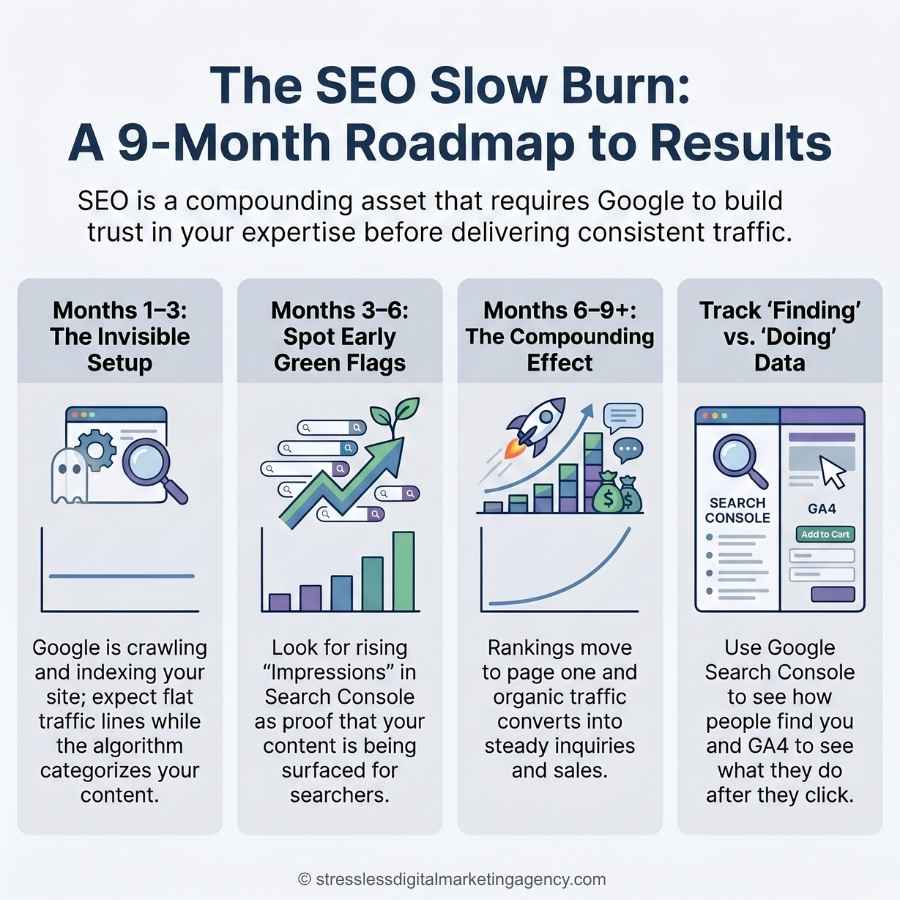
Months 1 to 3 tend to be quiet. Google is crawling, indexing, and categorizing. Impressions may begin to appear toward the end of this window, but traffic is minimal, and that’s completely normal. This is not the time to panic or pivot.
Months 3 to 6 are where you’ll start seeing real movement. Impressions grow, some pages begin ranking on page two or three, and organic traffic starts to trickle in. It’s also, unfortunately, the window where most people give up — right before the compounding effect kicks in.
Months 5 to 9 are when things start to feel real. Traffic compounds, ranking pages move higher, and for my own websites, this was the window where I started seeing consistent inquiry activity — contact forms, follow-up emails, and actual calls.
Month 9 and beyond is when the asset starts to work for you in a sustained way. Content published months ago continues to climb. New content indexes faster because Google already recognizes your site as a reliable source of valuable information.
One more thing worth saying here: the 3- to 6-month window is also when having an email list makes the biggest difference. SEO brings visitors to your site, but email marketing lets you capture their attention and stay in touch while they move through their own decision-making process. Those two channels working together are significantly more powerful than either one alone.
Learn more in: How to Build an Email Content Strategy That Converts (Without Feeling Spammy)
What To Do While You Wait
The slower early months are actually the best time to work on the technical health of your site — the stuff that compounds quietly in the background while your content builds momentum.
Audit your broken links. Broken internal or external links signal to Google that your site isn’t being actively maintained, and they also create a poor experience for any visitor who clicks them. Here’s a guide on how to find and fix broken links and why it matters more than most people realize.
Look at your site speed. Slow-loading pages hurt both user experience and rankings, and the penalty is bigger than most people expect. Read what a slow website actually costs you in lost clients for the specifics.
Check your alt text. Every image on your site should have a descriptive alt tag that supports your content’s keywords and accessibility. The complete alt text guide covers what to write, why it matters, and what most people get wrong.
Keep building internal links. Every new post you publish should link to at least two or three existing pages on your site, and you should also circle back and update older posts to link to new ones. It’s one of the most underused SEO levers available, it costs nothing, and the complete SEO guide for service providers walks through the full internal linking framework.
Ready to Build A Website That Compounds?
Setting up your tracking and staying consistent — those are the two things that matter most right now. Search Console and GA4 are free, they’re not complicated to set up, and together they give you everything you need to actually measure whether your SEO is working.
If you’re ready to stop guessing and start building a content ecosystem that drives real organic visibility, I’d love to show you how I do this for health and wellness businesses. Download my price and service guide to see what’s included, how it works, and what you can realistically expect.
FREEBIES TO GRAB BEFORE YOU GO
- Not sure why marketing isn’t clicking yet? Take the free quiz: What’s Keeping You Stuck With Marketing? Five minutes to get real clarity on where to focus next.
- Worried about what happens when your caseload shifts?Download the free guide: Stop Panicking When Clients Graduate Your website’s roadmap to generating organic inquiries between referrals.